 Community Magazine
Joomla Community Magazine Authors
Herman Peeren

Independent, creative software builder. Been around from punch cards to cloud computing. Proponent of a model driven approach.
I like modelling. When creating software you first make a model of the problem and solution. That is what philosophers have been doing for ages: building a model in order to better understand the complex world around us. The model and the modelling language are abstractions, found in a creative process.
Visit websiteArticles

How to automatically run a task in Joomla?
In Joomla we can automatically run tasks. Several standard tasks are shipped with Joomla, of which some are scheduled by default. But how do you run tasks? What settings do you need? We’ll show you step-by-step how to do that.
Read more …
Custom Plugins, part 3: Workflow Plugin
In episode 3 of our series about building custom plugins we will look at workflow plugins. With a workflow plugin you can create actions that are executed at a workflow transition. In this article we’ll show how to create your own plugins to adjust the publishing workflow or create completely custom workflows. We'll end with three concrete examples.
Read more …
Joomla Summer of Code
This summer four students/contributors will write code to help Joomla move forward. In this article we’ll introduce them and their projects about automated workflow, multi-category support, translator feedback for automatic translation and Ajaxifying the backend. Exciting times ahead!
Custom Plugins, part 2: Task Plugin
In episode 2 of our series about building custom plugins we will look at task plugins. With a task plugin you can schedule tasks that you want your website to do. In this article we’ll show how to create your own plugins to execute all kinds of tasks.
Read more …
Custom Plugins, part 1: General Overview
This is the start of a series of articles about building custom plugins. We will start with some general information about plugins and creating them. In subsequent episodes of this series we will take a closer look at specific plugin types and their peculiarities.
Read more …
Test your Extension, Part 5: Security
In this series, we explore methods and tools to test a custom Joomla extension. In this fifth and final episode we’ll check if your extension is secure.
Read more …
Test your Extension, Part 4: Accessibility
The Joomla project has invested considerable effort in making the CMS accessible to everyone. With every release we continue to improve this even more. Joomla’s core does well.
Read more …
Test your Extension, Part 3: PHPStan
In this series, we explore methods and tools to test a custom Joomla extension. In this third episode, we’ll use PHPStan, a tool to examine and debug source code before the program is run. You don’t even have to write a test to catch bugs at an early stage.
Read more …
Dependency Injection: What and Why?
If you use Joomla, you may have heard the term “dependency injection”. But what is it and why is it important? I’ll explain it as clearly as possible, to make it understandable for non-coders too.
Read more …
Test your Extension, Part 2: Cypress
In this series, we explore methods and tools to test a Joomla extension. In this second episode, we’ll focus on Cypress as a tool for end-to-end tests.
Read more …
Accessible Tables
What does a value in a table cell mean? Simply look at the header at the top of the column and/or somewhere at the beginning of the row. But what if you are blind?
Read more …
You can be a Mentor!
Sharing your experience shapes Joomla’s future. You can guide the next generation of Joomla talent. Joomla will grow from it, and you too.
Read more …
Test your Extension, Part 1: PHPUnit
In this series, we will explore methods and tools to test a Joomla extension. In this first episode, we’ll focus on PHPUnit for running tests. A practical guide: how to set it up, what to test, and… what not to test.
Read more …
How to contribute to user documentation
You can help to get better Joomla user documentation!
Read more …
Our four GSoC Contributors & Projects
Introduction of our four contributors and their projects for Google Summer of Code 2025.
Read more …
Tools to build a Component - 9: Overview and Conclusion
In the previous 8 episodes we looked at tools to build a Joomla component. In this last episode we’ll look back at the previous series and wrap it up.
Read more …
Virtual, Physical or… Both?
JDay USA 2025 was a remarkable combination of a physical and virtual event. It brought Joomlers together, both in person and online.
Read more …
Tools to build a Component - 8: Extension Generator
In this episode we will look at Extension Generator as a tool to to build a component.
Read more …
Pizza, Bugs & Fun: Joomla’s Community Recipe
On February 22, we came together once again for our global day of collaboration, dedicated to squashing bugs, testing pull requests, writing documentation, having fun, and… enjoying pizza!
Read more …
A Tutorial to Make a Tutorial
In this tutorial you can learn how to make a tutorial.
A tutorial is a lesson that takes you by the hand through a series of practical steps. It offers a learning experience by doing something. It is the best way to get to know a subject you are not yet familiar with.
Read more …
Tools to build a Component - 7: Joomla Component Builder
In this episode we will use Joomla Component Builder to build our example event schedule component.
Read more …
Diátaxis: Improving Joomla Documentation
Diátaxis is a methodology to improve documentation by dividing it into four categories, serving different needs. We are going to use this approach to improve the documentation of Joomla, but you can also use it to document your own extension or write user manuals for your clients.
Read more …
Tools to build a Component - 6: Component Generator
In this episode we will use Component Generator to build our example event schedule component.
Read more …
Get the Documentation Back on Track
What is the current state of Joomla’s documentation? What’s new and different? What are the future plans? How can you help?
Read more …
Tools to build a Component - 5: Component Creator
Our journey until now
In this series we want to show some tools that can help to build components for Joomla. The first four episodes were mainly to introduce the example, show some implementations of it without building a component and building a component without using many tools.
- In episode one we introduced our example, an event schedule, for instance for a Joomla Day. We explored the basic entities and made an implementation with core functionality (mainly additional fields 1). We were not yet building a component and didn’t use any tools other than Joomla itself.
- In episode two we showed an embedded implementation, using a Content Construction Kit (CCK) and Application Builder (Seblod and Fabrik). So, we still didn’t build a component, but we used some tools.
- In episode three we finally started building a component. We did that “by hand”, not using specific tools to build Joomla components. We also spent some time on relationships between entities and how those are implemented in Joomla.
- In episode four we listed additional features, built-in into Joomla, that you can use in your component. And showed some smaller tools to help set up a component.
Component Creator
In this episode we are going to look at Component Creator, an online Joomla scaffolding tool. Its aim is to save development time by generating most of the boilerplate code needed for a Joomla component. You basically define what tables you need and what fields they have. The whole MVC structure to maintain and display the information in those tables is made from them. The generated code is clean and follows the current Joomla style of coding, as seen in the core components. Although you’ll get an installable and working component, in most cases you’ll still have to do some customisation, especially on the front end.
Component Creator is a product of Jensen Technologies, founded by Søren Beck Jensen 2. They started to do some MVC scaffolding back in 2009, first as an internal tool. It was published for free and got quite some attention. In 2012 huge improvements were made and a paid version was released. The vast majority of users use the free version.
The free version is limited to one table, no subforms and no SQL-import. But even with just one table you can do a lot! It is nice to get you started with component development in an easy way. We could use the premium version to implement our multi-table example component.
At the moment Component Creator generates Joomla 3 or Joomla 4 & 5 components. As soon as a new version comes out you can easily regenerate the same component again for the newer version. In Component Creator this has its limitations, because you’ll also have to re-apply your customisations to the newly generated component. But there are plans to improve that in the future.
Our example: event schedule
We have built our example event schedule in four different ways now: core/additional fields, Seblod, Fabrik, and we have coded a real component ourselves. We made an event schedule using some data from the Dutch JoomlaDagen 2024, with five simultaneous rooms (“sections”) on two days (“containers”). The locations became columns in the schedule and the days were rendered as tabs:
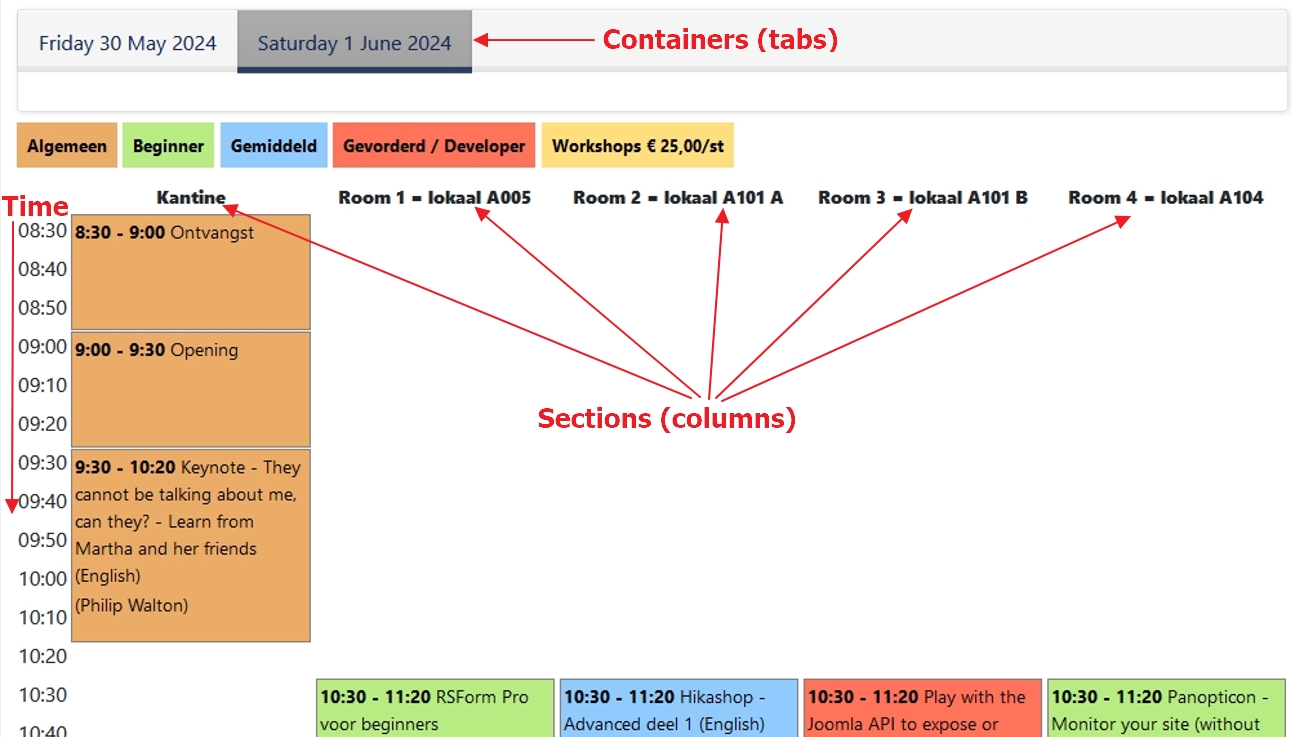
In our basic component we now have the following entities:
- Events: things that happen during some time in a day, like a presentation at a conference. They can be of some type, for instance beginners, advanced etc.
- Sections: events that occur with overlapping time in the schedule are placed in a different section. The rooms in the above schedule are an example of sections.
- Containers: different schedules can be put into containers. They are implemented as tabs. In the above example we have two tabs for the two days of Dutch JoomlaDagen, the Friday and the Saturday.
- Actors: events are “done” by actors. For instance, at a music festival the performances (events) are done by bands (actors).
- Event Schedules: different editions of some festival or conference.
Per Event Schedule we have this Entity-Relationship Diagram (ERD):
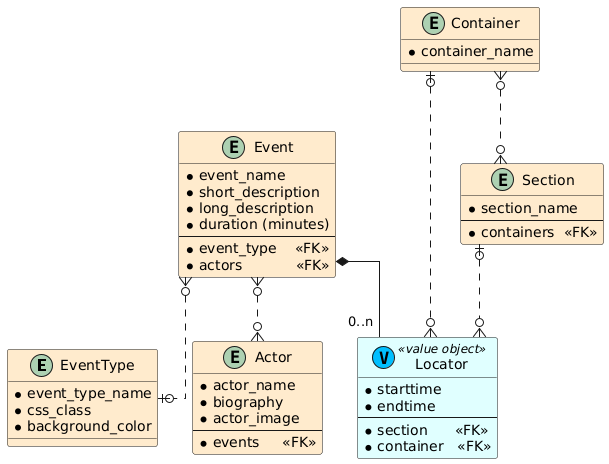
Event schedule example in Component Creator
In Component Creator I followed these steps:
- Fill in the basic information for a component, like its name, your name, the licence, the namespace and which language files you want to add (all will be filled with English texts).
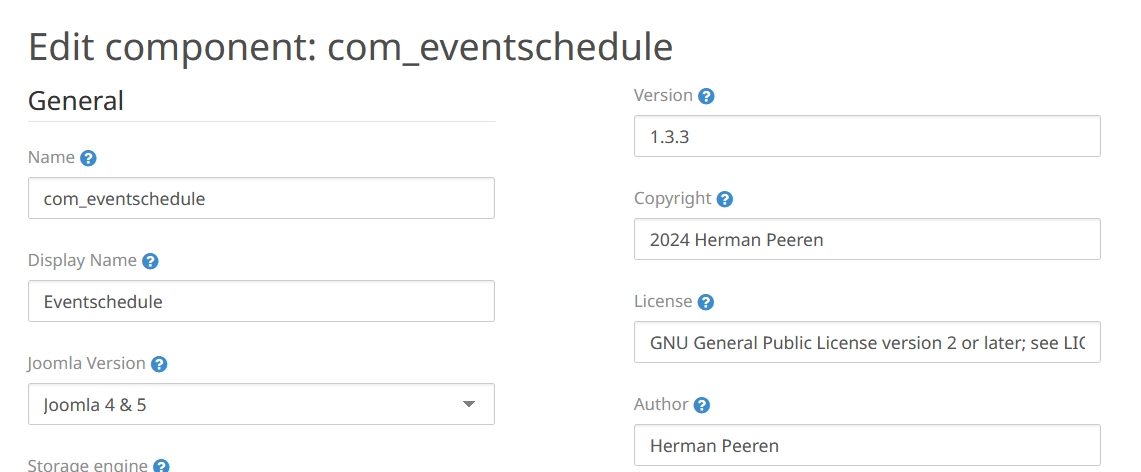
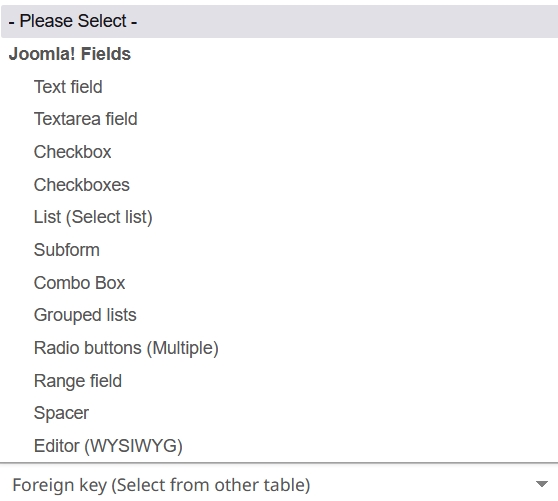
Extras: Component Creator can add breadcrumbs navigation. Or (premium only): restrict users to only view their own data or create a module. - Create tables and fields for all entities. You can use almost all Joomla fields, including sql-fields (to refer to other tables with a foreign key). You can also use some special fields from Component Creator, like the foreign key field.
Some nice features for tables. You can:
- Choose for a Nested table type.
- Choose for ACL control on individual items.
- Add content versioning.
- Add a web services API.
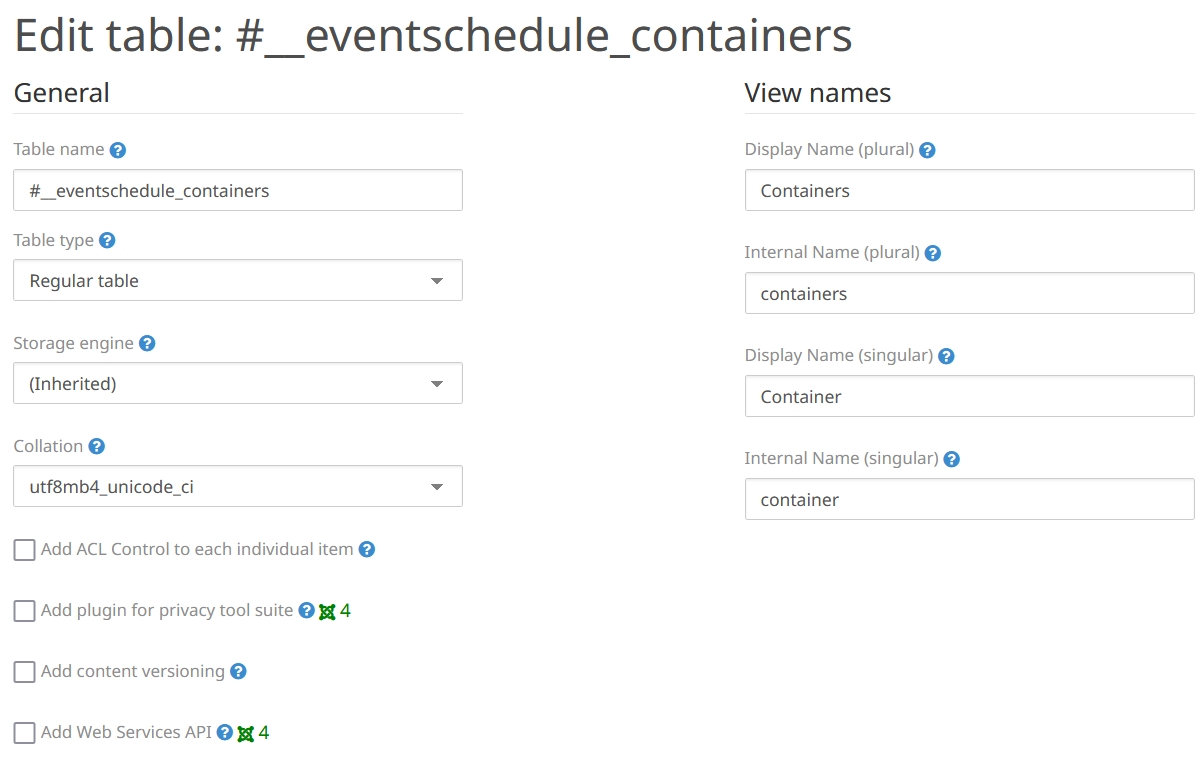
By default Component Creator adds an id and some standard fields(ordering, state, checked_out, checked_out_time, created_by, modified_by) that can be removed. When choosing a nested table it proposes to add parent_id, lft, rgt, title, alias, access and path.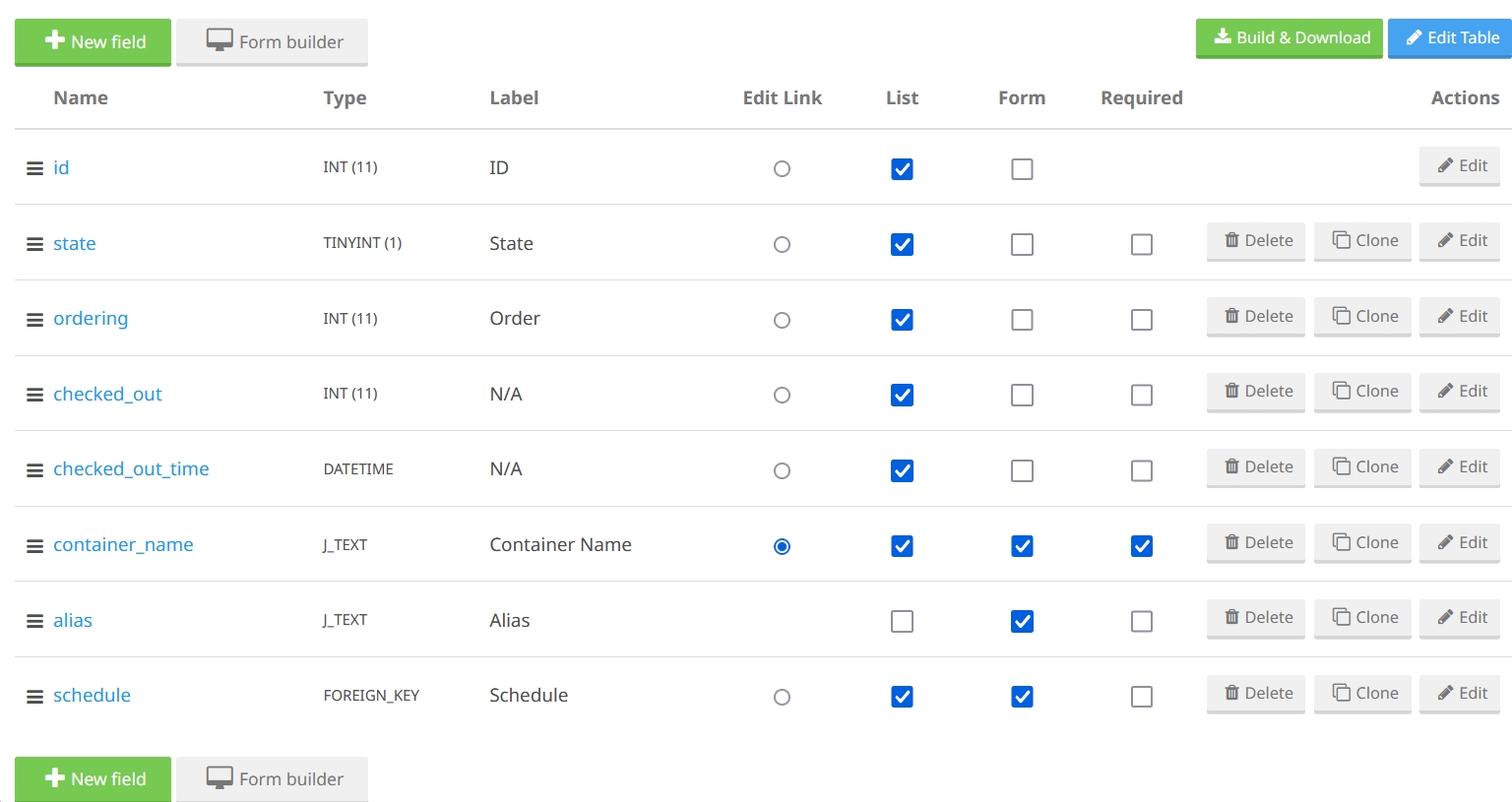
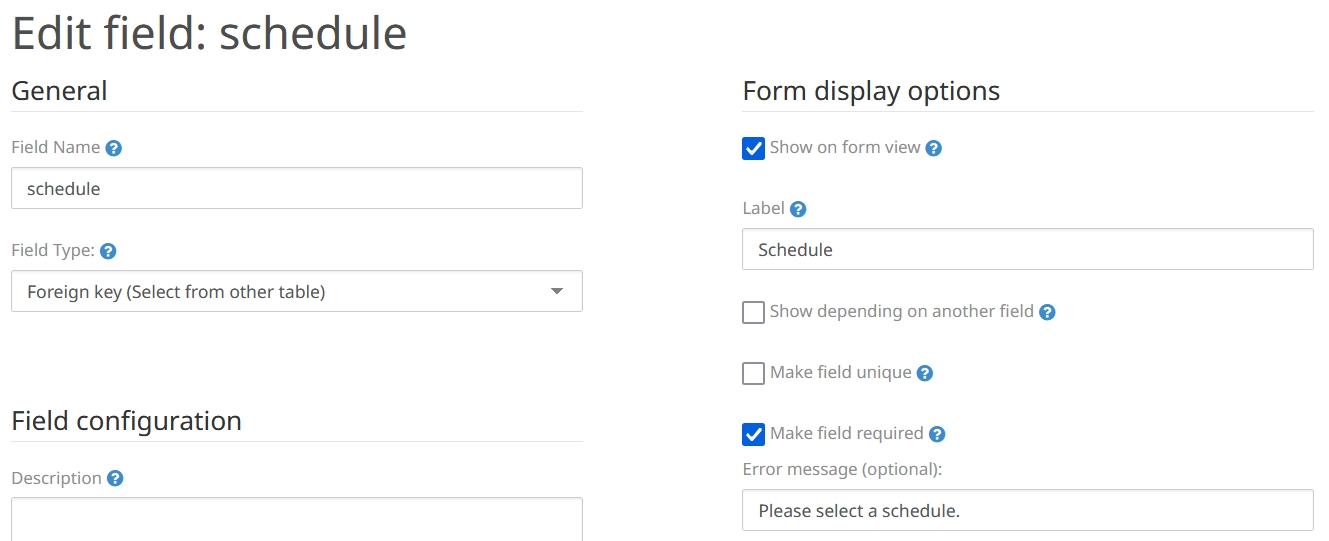
If you add a category-field to your entity, a menu item for categories in your component is added automatically to your manifest-file. The Joomla categories component is used, but still you can choose multiple categories (Oops, will that always go well with ACL rights?).<menu link="option=com_categories&extension=com_eventschedule.events" view="categories" alt="Eventschedule/Categories">COM_EVENTSCHEDULE_EVENTS_CATEGORY</menu>
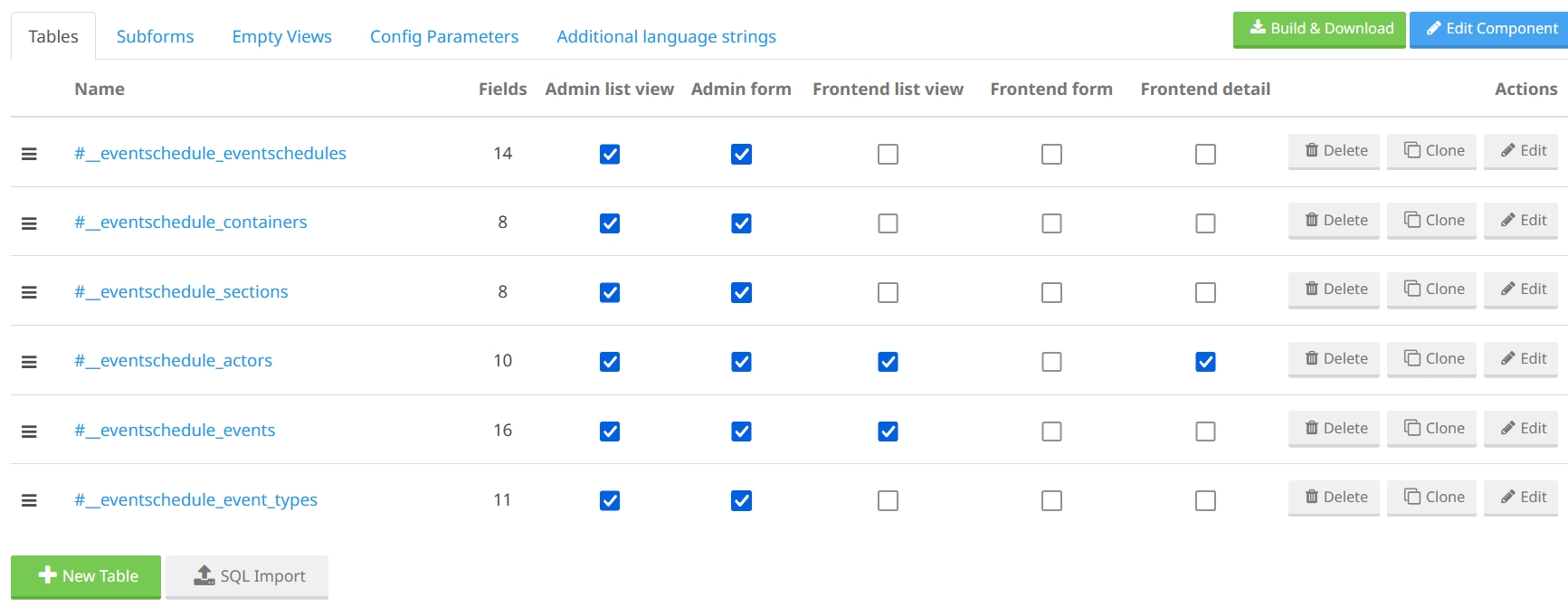
If you want to use tabs to organise the form fields, you can use the Form builder. That keeps the form clear. - Check for each table what views you want:
- Admin list view.
- Admin form.
- Frontend list view.
- Frontend form.
- Frontend detail.
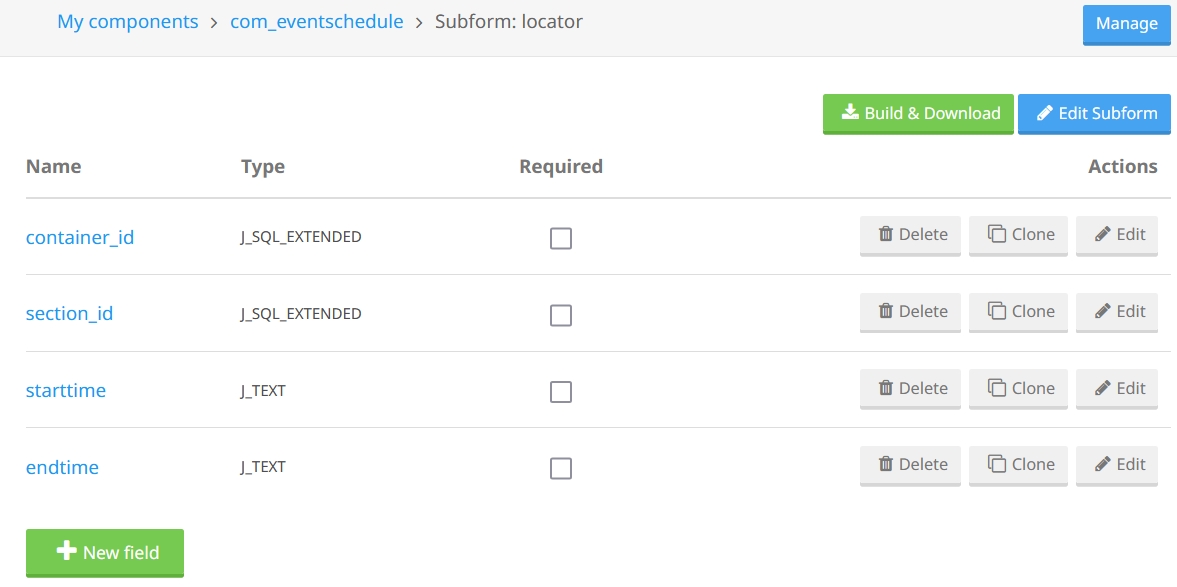
- Add a subform. We have our locator subform to add in which container (for our JoomlaDay example: on what day), in which section (in what room), which start time and which end time the event will be. An event can have multiple locators (can be done multiple times), so when you make the locators subfield in the event, check “multiple”.
- Put general parameters in the tab “Config parameters”.
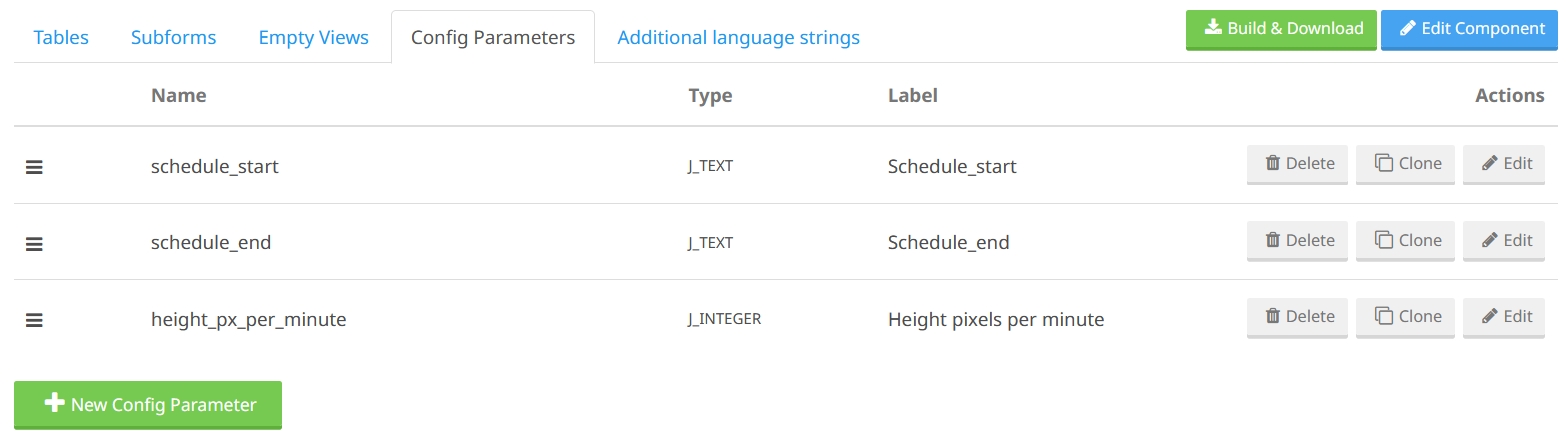
- Build & Download the component. Yes, really, that’s it. You get a fully functional component, ready to use.
- If you want a nice schedule as output, you’ll have to make a special view layout template for it, for instance based on the events list view. You can also make an “empty view”, to only make a raw MVC-skeleton. Or create a template override. But this is not shipped with the component.
Future enhancements
The Component Creator team is working on a system to include custom code. Event triggers will be added to models in such a way that you can develop your customisations via plugins. The plan 3 is to allow users to enable the triggers in the Component Creator interface and also add the possibility to store the custom plugins with your component online in Component Creator. An online code editor will be added to input the plugin online. The plugins will be part of the generated package and so installed with the component.
This would be a much wanted step forward toward true Model Driven Engineering (MDE), where updating a component online (“the model”) preserves your customisation. Until this is implemented you’ll have to re-apply your customisations yourself after each update of the component.
Many-to-many relationships
Component Creator does a nice job with many-to-one (n:1) relations with an sql-field or their own foreign key field. But it lacks proper handling of a many-to-many (n:n) relationship, using a junction table. In our example we have events (for instance: presentations) that are done by actors (for instance: speakers/presenters) as a many-to-many relationship: an actor can do multiple events and an event can be done by multiple actors. That relation is stored in a junction table. I now implemented it as two separate foreign keys that can both have multiple items. But if you add an event to an actor, the actor is not automatically also stored with the event.
OK, in our event schedule example it might be doable to add the relation on both sides, but in many components this can lead to crucial and undesirable inconsistencies. As we saw in episode three, it is not too difficult to implement a proper many-to-many relationship in a component. We did it the same way as is done in Joomla’s core, for instance with users and user groups. And Fabrik in episode two was also a nice example of adding a junction table automatically in the background.
It would be a nice feature if many-to-many relationships would once be added to Component Creator.
“Bells & Whistles” used in Component Creator
In last month's episode of this series I listed features that are built-in into Joomla and can be used in our own component. What of that is being used by Component Creator?
| 1. | ✅ | Language strings | |
| 2. | ✅ | General parameters | |
| 3. | ✅ | Item ordering | |
| 4. | ✅ | Alias handling | Needs title field for automatic creation |
| 5. | ✅ | Locking, check-out | |
| 6. | ✅ | Filters & search in list view | |
| 7. | ❌ | Custom Form Fields | = Developer defined field types |
| 8. | ✅ | Column sorting in list view | |
| 9. | ✅ | Trash | |
| 10. | ✅ | Batch processing | |
| 11. | ✅ | Categories | Multiple categories possible |
| 12. | ✅ | Tags | Needs some alias field |
| 13. | ✅ | Pagination | |
| 14. | ❌ | Form validation | Only standard filter and regex pattern matching |
| 15. | ✅ | Access Control Lists (ACL) | |
| 16. | ❌ | Additional Fields | = User defined “Custom fields” |
| 17. | ❌ | Multilingual association | |
| 18. | ❌ | Hide table columns in admin list view | |
| 19. | ✅ | Versioning | |
| 20. | ❌ | Adding extra toolbar buttons | |
| 21. | ❌ | Hits, rating | |
| 22. | ✅ | Router / SEF URLs | |
| 23. | ❌ | Workflow | |
| 24. | ❌ | Metadata | |
| 25. | ❌ | Email cloak | |
| 26. | ✅ | Finder plugins | Frontend search in lists |
| 27. | ❌ | Help pages | |
| 28. | ❌ | Action logs | |
| 29. | ✅ | Module as extra view | |
| 30. | ❌ | Add plugins | |
| 31. | ✅ | Web services / API | |
| 32. | ❌ | CLI |
Component Creator for bulk work setup
When building a component a lot of bulk work has to be done, like setting up the tables, models, controllers and views both for list views and for form views.Using a generator like Component Creator will save even an experienced developer hours of work.
Component Creator as migration help
Some extension developers had quite some trouble to adjust their code to the current Joomla 5 code style, using namespaces, dependency injection, MVC-classes in the /src-directory etc. Well, Component Creator can be of help to migrate your stuff by using the SQL import feature. You have Component Creator read your SQL installation file, for instance from a Joomla 3 component. From those tables you tell Component Creator what views you’d want to have and voilà you have your basic component in good Joomla code, following the latest standards.
I tried it out with PhocaCart version 4.0.11. You can run this component on Joomla 4 or 5, but the structure is not up to date following Joomla’s actual standards. So I imported the SQL file from the install folder of PhocaCart and 💥 all 83 tables were read into Component Creator. Some newer fields were proposed to add by Component Creator, like the “state” field, but I also left the “published” field to input an older PhocaCart file. Push the button and all tables were added to my Phocatest component.
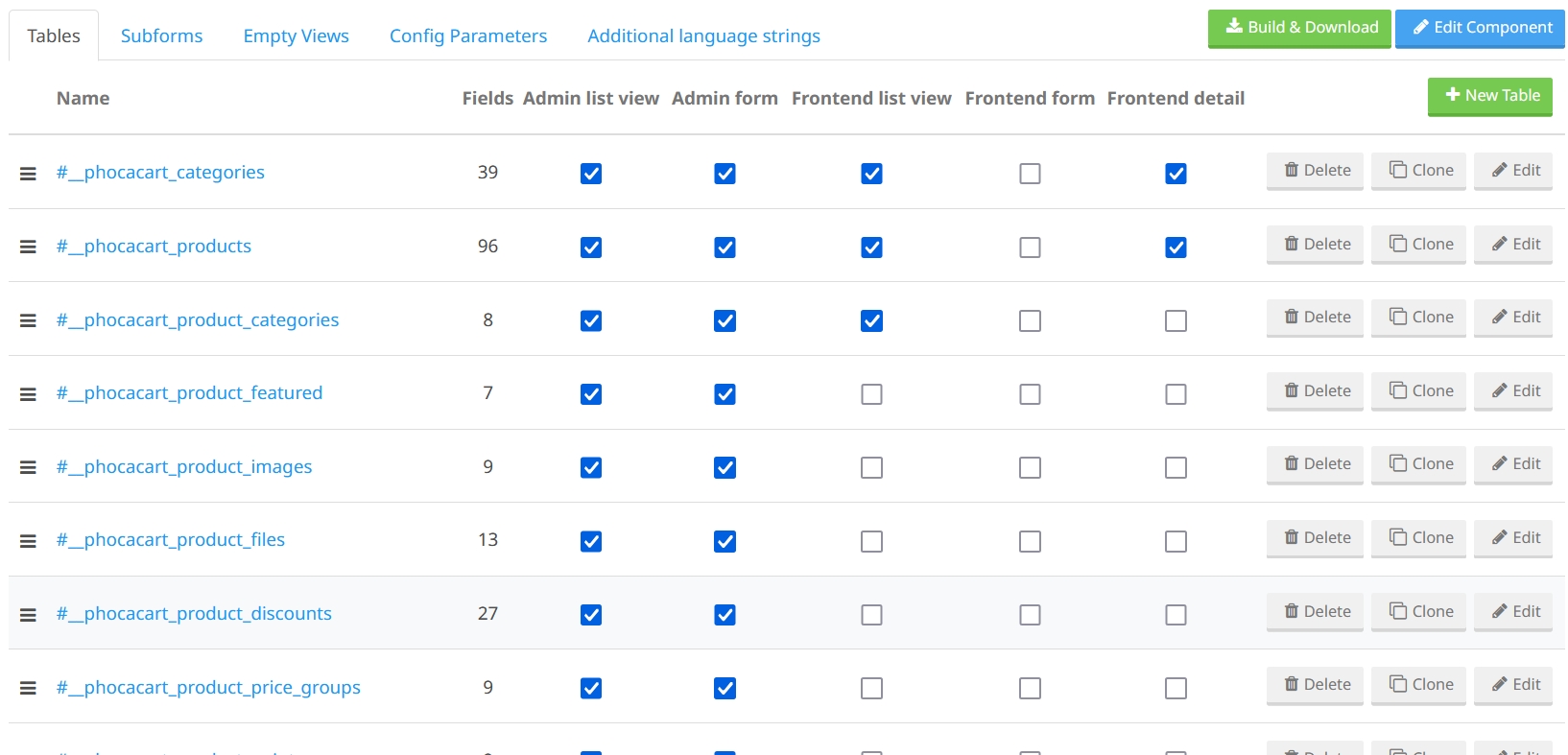
There are a lot of foreign keys in those files and normally Component Creator would recognise them automatically (like it recognises foreign keys to core tables), but because during import none of the PhocaCart tables were there yet, the foreign keys were not automatically resolved 4. So that had to be done by hand. The only problem I encountered was with the imported wishlist-table: an “internal name” is automatically made from that table name but cannot contain some reserved keywords, of which “list” is one. So I had to adjust the “internal name” in the table definition.
Unfortunately the junction tables for the many-to-many relations could not be used in Component Creator, so it was not yet complete. But a lot of the views were rebuilt in a nice Joomla 4 & 5 style after pushing the “Build & Download” button. A large part of the bulk job for such a migration was done in a very short time… a good start for a migration.
Component Creator as a learning tool
The interface of Component Creator is simple and intuitive. Most forms are self explanatory. The current documentation consists of 7 videos, in total about one hour, and then you are all set. You can now create a Joomla component, without writing a single line of code. The free version already gives very useful results, so even as a novice developer or non-coding person, you should have a look at it.
Component Creator produces nice code, so by looking at that code you’ll learn a lot about how a Joomla component is built correctly. Combine it with a book about component development and you’ll have a kickstart in your career as extension developer.

In the coming episodes we will show other tools to make Joomla components. At the end of this series we can compare them and list some pros and cons.
Next month
In the next episode (December edition) we will look at a very similar online service, also with a free and paid plan: Component Generator.
In January we will have a look at a completely free and open source tool: Joomla Component Builder. In February we’ll show another tool. So, stay tuned to see them all!
Resources
Component Creator:
- https://www.component-creator.com
- Documentation videos: https://www.component-creator.com/en/help/documentation
- Magazine article January 2014: https://magazine.joomla.org/all-issues/january-2014/component-creator-for-joomla
Building a component:
- Joomla! Programmers Documentation, our ever expanding online source of information.
- Book: “Developing Extensions for Joomla! 5” by Carlos Cámara.
- Online book: "Joomla Extension Development"by Nicholas Dionysopoulos.
- Robbie Jackson’s tutorial: “Developing an MVC Component”. Made for Joomla 3, but there is a lot that is still useful.
- Look at core components. They are supposed to be an example for your own code.
- Book: "Developing Extensions: Step by step to an working Joomla extension" by Astrid Günther. Out of sale at the moment; hopefully a new version will be published.
Articles in this series about Tools to build a Component:
- Episode 1: Introduction and Core Solution
- Episode 2: An Embedded Application in Joomla
- Episode 3: Creating a Component
- Episode 4: Built-in extras and some setup tools
- Episode 5: Component Creator (this article)
Extra material like the code for our example event schedule component can be found in the repository for this series.
Notes
- In episode one I explained why I use the term “additional fields” instead of “custom fields”. I use “form fields” for the fields that we use in our forms in the components we build. Both additional fields and form fields can be standard and custom.
- Zie interview met Søren about his favourite Joomla 4 feature (extendibility): https://magazine.joomla.org/all-issues/december-2021/my-favourite-joomla-4-feature-extendibility-soren-beck-jensen (December 2021)
- Zie https://www.component-creator.com/en/blog/92-component-creator-event-triggers-proposed-solution
- I’ve submitted a feature request to enhance the import. Bugs and feature requests can be found in https://github.com/aDaneInSpain/component-creator-issues/issues.
A FOREIGN KEY constraint could also be explicitly stated in the CREATE TABLE MySql command, but I haven’t tried out if Component Creator would recognise it. Whatever, the PhocaCart SQL file I used for this import didn’t have such FOREIGN KEY constraints.
Read more …
Tools to build a Component - 4: Built-in Extras and some Setup Tools
In this episode we will expand our example component, mainly by using features that are built-in into Joomla. And we show some tools that can help us setting up a custom component.
Read more …
Tools to build a Component - 3: Creating a Component!
Finally we will build a real Joomla component for our example event schedule! We’ll explore how to implement relationships between entities.
Read more …
Tools to build a Component - 2: An Embedded Application
In the second episode of our building-tools adventure we'll delve deeper into our event schedule example and explore how to implement it using two Joomla application builders — Seblod and Fabrik. We'll not yet create a full component, instead we’ll embed our application within these extensions. By doing so we will also get a better understanding of the requirements for the component we want to build in subsequent articles of the series.
Read more …
Tools to build a Component - Episode 1: Introduction and Core Solution
A series of articles about tools that can help you to create a Joomla component. But we start with showing that a lot can be done with core Joomla, without building a custom component.
Read more …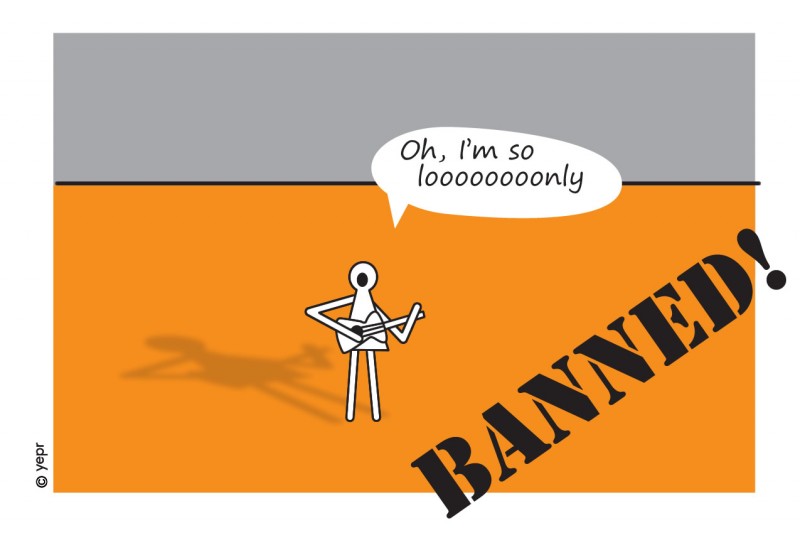
Why the Poor Old Singleton was Banned
The once very popular Singleton design pattern has become an anti-pattern. From hero to outcast. Like a sportsman who was caught doping. What happened?
Read more …
Open Source Awards: Vote for Joomla!
The annual Open Source Awards are here again. You can nominate and vote for your favourite CMS and other Open Source projects in the Hall of Fame CMS category.
Read more …